Search-as-You-Type in a Microsoft Access Form
Implement dynamic, real-time live search filtering for listbox controls and continuous forms.
Modern search-as-you-type interfaces give users immediate feedback as they type. While Access combo boxes support basic type-ahead matching, list boxes require a lightweight VBA module to deliver true real-time filtering.
Enhance Listbox Navigation
Listboxes offer a clean visual representation of records without forcing users to open dropdown menus. Follow the step-by-step implementation guide below to add live search filtering to any Access form.
💾 Download Free Sample Access Database (.ZIP)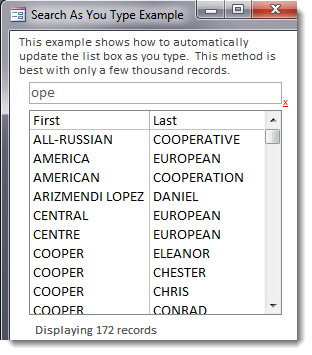 🔍 Click to enlarge
Step-by-Step Implementation Guide
modSearch into your Access database.
txtSearch and set its Default Value property to:
btnClearFilter with caption "X" to clear the filter quickly.
txtCount to display total matching rows.
Option Explicit), add:
Form Event Procedures
Assign this code to the txtSearch_KeyPress event to prevent premature filtering when entering spaces:
Resets the search box and triggers the change event to restore full records:
Manages the placeholder prompt text as the user navigates into and out of the search box:
Executes every time the user types a character, passing queries to fLiveSearch():
fLiveSearch function, substitute RowSource with RecordSource, and replace ListCount with RecordsetClone.RecordCount.