Very simply, Microsoft Access is an information management tool that helps you store information for reference, reporting, and analysis. Microsoft Access empowers you to analyze large volumes of data and manage relational data far more efficiently than Microsoft Excel or other spreadsheet applications.
The Problem with Spreadsheets
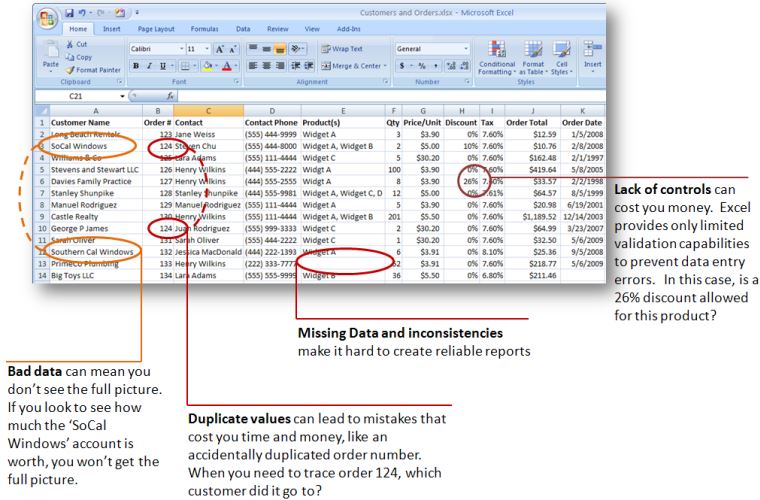
A spreadsheet program is a terrific tool for maintaining and calculating small, isolated sets of numbers. Microsoft Excel is intuitive: enter column names, populate rows, write formulas, and sort or filter quickly.
However, spreadsheets struggle when managing hundreds or thousands of interconnected records where you need "one version of the truth" for customers, inventory items, or project contacts. Formulas can be broken by accident, duplicate records proliferate, and reporting accurately becomes a tedious chore.
The Solution: Store Related Information Once, Eliminate Redundancy
Relational databases organize related information centrally, allowing you to connect distinct records (often referred to as "entities") without data duplication. Key advantages include:
- Fewer Errors and Inconsistencies: Maintaining a single record for each customer, product, or supplier eliminates mismatched spellings, transposed digits, and fractured reporting metrics.
- Higher Team Productivity: Updating a client's address or phone number in one central record immediately updates every linked invoice, quote, and contact log across your database.
- Granular Security & Control: Access databases offer password protection and encryption, ensuring sensitive operational records are securely managed in one place rather than scattered across dozens of unprotected desktop files.
- Actionable Business Insight: Centralized tables make historical trending, complex query aggregations, and executive dashboard reporting simple and reliable.
How Does a Microsoft Access Database Work?
Microsoft Access stores related information together and establishes structured connections (known as relationships) between tables. Whether linking simple one-to-one contacts or complex one-to-many transactions, Access maintains strict data integrity.
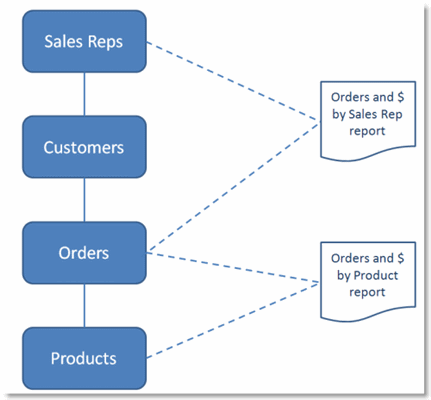
Data resides in Tables (structured with dedicated field types such as Dates, Integers, or Strings). You can then design intuitive Forms for frictionless data entry and generate polished Reports with click-and-drag simplicity.
Ready to take the next step?
Discover when to deploy Microsoft Access across your organization, or download our comprehensive guide.
Continue to Page 2: When Should I Use Access? »Learn best practices, application design patterns, and low-code extension techniques.