UI BuilderTM for Microsoft® AccessTM
Deploying User-Level Menus with a Single Back-End Access Database

|
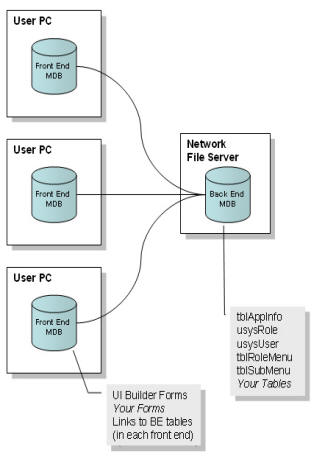
1) Create a new back-end database, or use the Microsoft Access Database Splitter utility to move tables to a new back-end database. 2) Ensure the following tables associated with UI Builder are moved to the back-end database:
3) Ensure each front-end database you have deployed to your users is linked to the back-end database tables identified above. 4) OpenGate Software recommends you turn logging on for each of the front end databases. This will create a persistent connection to the back end database, reducing the time needed to open tables and change between forms. Now when you add/modify/remove users and role-based menus, the changes will be immediately available to all instances of your database application without additional effort. |
 |
Don't have UI Builder Enterprise Edition? Order Now>>